Some AI assistants can now use a computer or a web browser for you. They fill in forms, press buttons and move between tabs. But an AI has no eyes and no hands. So what does the screen look like to it, and how does it know where to click?
There are two answers, and for a while they competed.
Look, act, look again
An AI that uses a computer works in a loop. It gets a view of the screen and picks its next action, such as “click here” or “type this”. A small program on the computer carries out that action. Then the AI gets a fresh view, checks what changed and picks the next step. This repeats until the job is done.
The AI doesn’t plug into each app. It works through the same screen, mouse and keyboard a person uses, only virtual ones.
The view of the screen comes in one of two forms: a picture or a written list.
The first way: a screenshot
The simplest view is a screenshot. Claude, Anthropic’s AI, doesn’t take in a picture one dot at a time. It cuts the picture into small squares, each 28 by 28 pixels (a pixel is one tiny dot of colour). On Anthropic’s newest models, a screenshot 1920 pixels wide and 1080 tall (often called full-HD) becomes 2,691 squares.
Big pictures cost more to handle, so every model has a size limit. On older Claude models, that same screenshot is shrunk to 1,456 × 819 pixels first, and shrinking can make small text hard to read. So the computer-use tool has a zoom action: the AI can ask for a close-up of one part of the screen, such as a tab title or a button label.
Then comes the hard part: knowing exactly where to click. When Anthropic first trained Claude to use computers in 2024, it said the model counts how many pixels it needs to move the cursor to land in the right place, and that teaching it to count accurately was “critical”.
Screenshots have another weak spot. Anthropic compared the AI’s view to a “flipbook”: a run of still pictures, not a video. A message that pops up and vanishes between two screenshots can be missed. Recording demos for the launch brought funny slips too. In one, Claude stopped in the middle of a coding demo and started browsing photos of Yellowstone National Park.
The second way: the list made for screen readers
Blind and low-vision people use screen readers, programs that read the screen aloud. For that to work, the computer has to describe the screen in words. A browser does this by building something called an accessibility tree. It lists most of what is on the page, with the items nested like a family tree: sections hold buttons, links and text boxes. Each item says what it is (a button, a text box), what it’s called, and its state, such as whether a box is ticked.
An AI can read the same list. We built a small booking page and asked a browser for both views. This is exactly what came back.
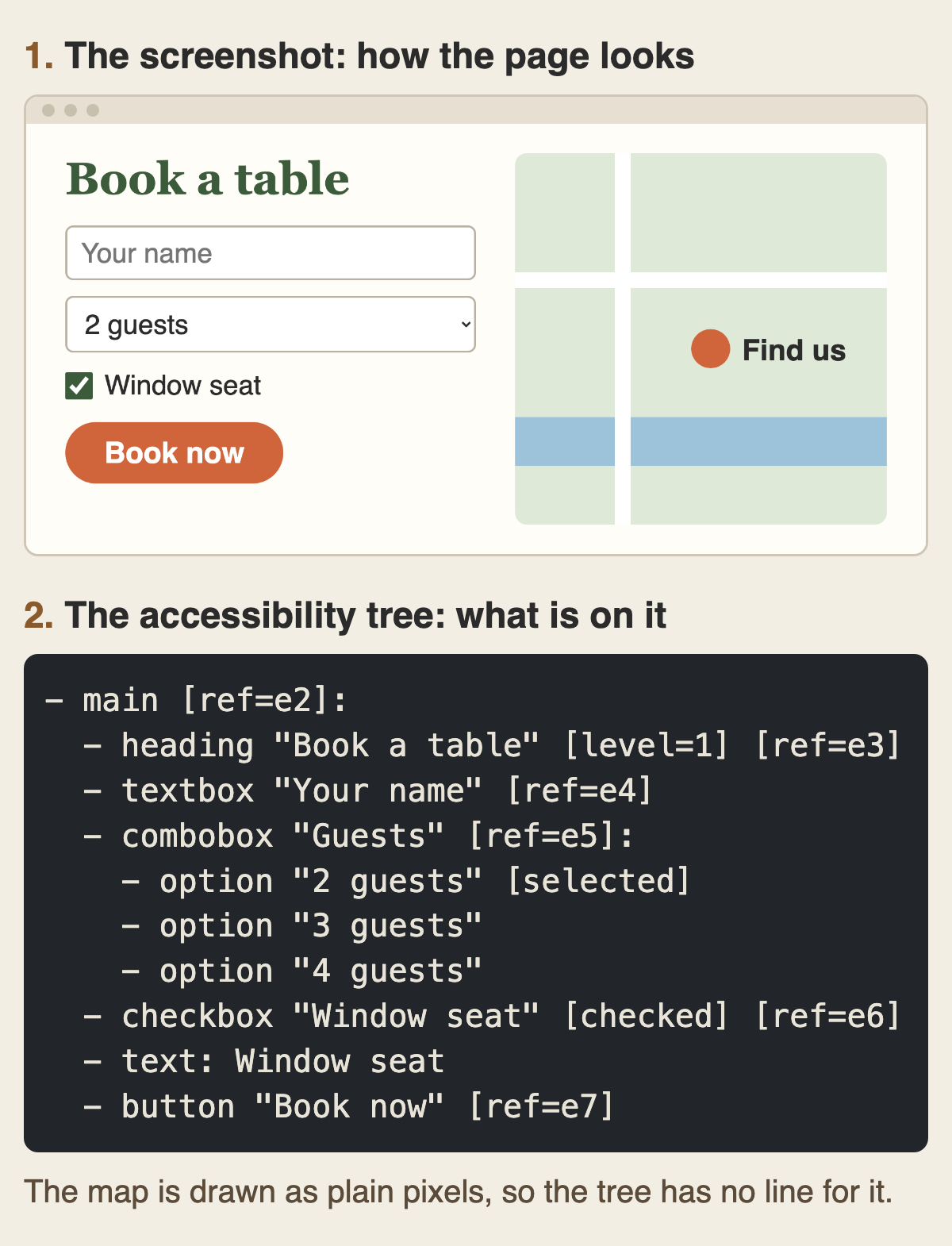
Most items in the tree have a short label, such as e7 for the “Book now” button. To press it, the AI just asks to click e7. It doesn’t have to measure pixels, and the click usually still lands if the page shifts a little. Anthropic says reading the tree often costs less than taking a screenshot, too.
But look at what’s missing. The tree doesn’t say the button is orange, and it has no line at all for the map, because the map is drawn as plain pixels. Anthropic lists the same kind of blind spot: things drawn straight onto the page, embedded videos and windows that show another computer’s screen.
The tree has other limits. It is only as good as the labels app makers write, and a button nobody named is a mystery. On a full computer desktop it can also be enormous. The researchers behind OSWorld, the test described next, said the raw tree ran to millions of tokens, the small chunks of text an AI reads, so they had to cut it down hard.
In short, a screenshot shows how the screen looks, and the tree says what is on it.
Which way worked better?
In April 2024, researchers released OSWorld, a test of 369 real tasks on a real computer system, in common apps such as Chrome, LibreOffice and VS Code. People managed 72.36% of the tasks. The researchers gave AI models different views of the screen and compared the results. GPT-4V is the version of GPT-4 that can also look at pictures.
| What the AI saw | Model | Tasks done |
|---|---|---|
| Accessibility tree only | GPT-4 | 12.24% |
| Screenshot and tree | GPT-4V | 12.17% |
| Screenshot only | GPT-4V | 5.26% |
| People, for comparison | 72.36% |
For the GPT-4 models, the list did more than twice as well as a screenshot alone, though the researchers found the pattern varied between models. Even so, the researchers wrote that screenshots alone “should be the ultimate configuration in the long run”, because the tree may not work well in every app and the list is so long.
Six months later, in October 2024, Anthropic released computer use for its Claude 3.5 Sonnet model. Working from screenshots alone, it completed 14.9% of the OSWorld tasks, higher than the tree-reading score from April. Anthropic still called it “slow and often error-prone”. By February 2026 the company reported 72.5% for Claude Sonnet 4.6 on an updated version of the test. Because the test changed, that number can’t be set directly against the 72.36% people scored. Anthropic says the model still lags behind the most skilled humans. These are Anthropic’s own scores.
The computer-use models from Anthropic and Google both work from screenshots.
In the browser, the list comes back
Web pages are different. They are built from code that already names each button and link, so the browser can hand an AI a ready-made tree for the whole page.
Microsoft’s Playwright MCP, a tool that lets AI assistants drive a browser, works from the tree by default, not from pixels. It can take a screenshot, but its own documentation says the AI can’t act on what a screenshot shows, and clicking by screen position is an extra you have to switch on. Anthropic’s browser tool uses both views: it advises reading the tree first and taking a screenshot when the look of the page matters. Google’s Gemini 2.5 Computer Use model, built mainly for browsers, still works from screenshots.
So on the desktop, AI mostly looks. On the web, it often reads the list that was built for people who can’t see the screen.
The screen can talk back
Whatever an AI reads, it might obey. A web page can hide a line such as “disregard previous instructions” to steer the AI somewhere it shouldn’t go. This trick is called prompt injection. When Anthropic tested Claude in Chrome against 123 planned attacks in 2025, with Claude acting on its own, 23.6% of them succeeded before Anthropic added defences, and 11.2% after.
That is why Anthropic tells people to keep AI browsing away from banking, health records and logins you wouldn’t share, and to have a person confirm anything that matters, such as paying or agreeing to terms.